
How to Create the Perfect Consultation Template in ConsultScribe
A step-by-step guide to building templates that save you hours every week
If you're a physiotherapist, remedial massage therapist, GP, or any professional who writes consultation notes, you already know how much time gets eaten up by formatting the same information over and over.
The good news: with ConsultScribe's custom template system, you can turn that repetitive work into a one-click process. A well-built template can take a raw transcript and produce a clean, branded, professional report in seconds.
Here's exactly how to create one that actually works for your practice.
Why Templates Matter (and Why Most People Get Them Wrong)
A bad template creates more work. A great template disappears — you barely notice it's doing the heavy lifting.
Common mistakes we see:
- Too rigid — no flexibility for different clients or session types
- No AI instructions — the output is generic or misses key details
- Missing placeholders — you end up typing the same things repeatedly
- No branding — reports look unprofessional when exported
The goal is to build something that feels like it was written by you — but in a fraction of the time.
Step 1: Start with a Clear Structure
Most consultation notes follow a familiar pattern. Choose one that fits your workflow:
- SOAP (Subjective, Objective, Assessment, Plan) – ideal for physio and allied health
- History → Findings → Recommendations → Follow-up
- Session Summary → Action Items → Next Appointment
Example starting structure (SOAP style):
Subjective:
[Client reported...]

Objective:
[Findings from session...]

Assessment:
[Interpretation...]

Plan:
[Recommended actions...]
Next appointment: [date/time]
Step 2: Add AI Instructions with {curly braces}
This is where the magic happens. Anything inside {curly braces} is an instruction to the AI.
Good examples:
{Write in professional yet warm tone, like a caring physio}
{Be concise – max 2 sentences per section}
{Use bullet points for action items}
{If client mentioned pain level >7/10, highlight it in bold red}
Tip: Be specific. Vague instructions = vague output.
Not sure where to start or how to phrase your instructions? Use our built-in AI template assistant! Just describe what you want in plain English (e.g. "Create a SOAP template for physio sessions with bullet points for actions"), and it will generate a starting template for you. Then tweak it to perfection.
Pro tip: The AI assistant can also refine existing templates — upload a .docx or paste your current version and say "Make this more concise with bullet points."
Step 3: Use [placeholders] for Dynamic Content
Anything inside [square brackets] becomes a fillable field in the final report.
Client Name: [Client name]
Age: [Age]
Session Date: [Date]
Pain Level: [Pain level /10]
The AI will either extract these from the transcript or leave them blank for you to fill in manually.
Step 4: Build a Real Example (Physio SOAP Template)
Here's a complete, ready-to-use template for a physiotherapy consult:
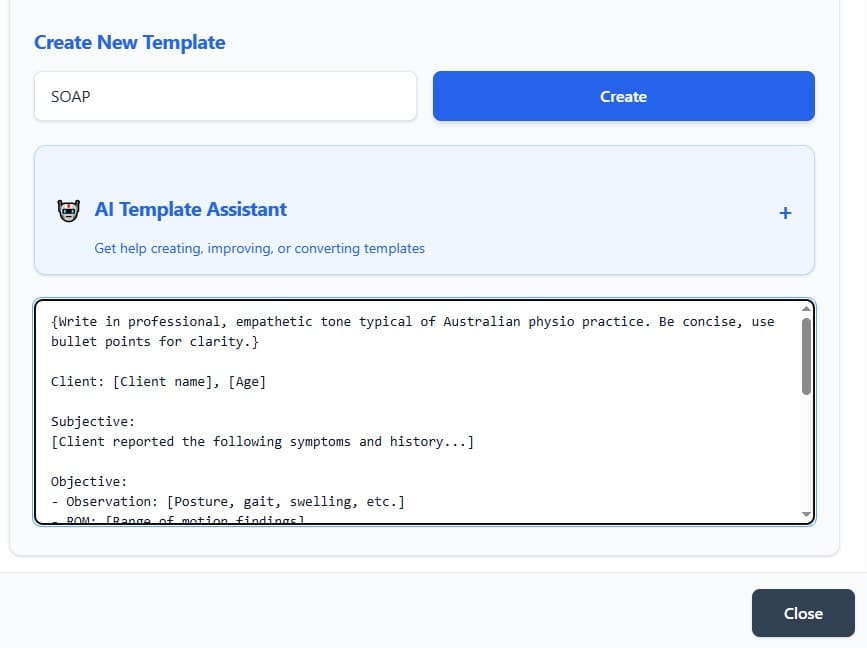
{Write in professional, empathetic tone typical of Australian physio practice. Be concise, use bullet points for clarity.}

Client: [Client name], [Age]

Subjective:
[Client reported the following symptoms and history...]

Objective:
- Observation: [Posture, gait, swelling, etc.]
- ROM: [Range of motion findings]
- Strength: [Muscle testing results]
- Special tests: [Positive/negative findings]

Assessment:
[Your clinical interpretation – keep factual and clear]

Plan:
{List 3–5 specific, actionable next steps}
• [Action item 1]
• [Action item 2]
• [Follow-up recommendation]

Next appointment: [Suggested date/time]

Signed: [Your name], [Qualifications]
Copy-paste this into ConsultScribe's template editor and test it with a sample transcript — you'll be amazed how close it gets on the first try.
Step 5: Let the AI Assistant Help You Build or Improve Templates
Not sure where to start or want to refine an existing template? ConsultScribe comes with a built-in AI assistant (the chat window in the template editor) that can help you create templates from scratch or improve the ones you already have.
Simply describe what you want in natural language, and the assistant will generate a template structure for you. Examples of prompts you can use:
- “Create a simple SOAP template for a remedial massage session, focusing on client feedback and aftercare advice.”
- “Make a short follow-up template for physiotherapy patients with bullet points for exercises and precautions.”
- “Improve this template to be more concise and add a section for red flags: [paste your existing template here]”
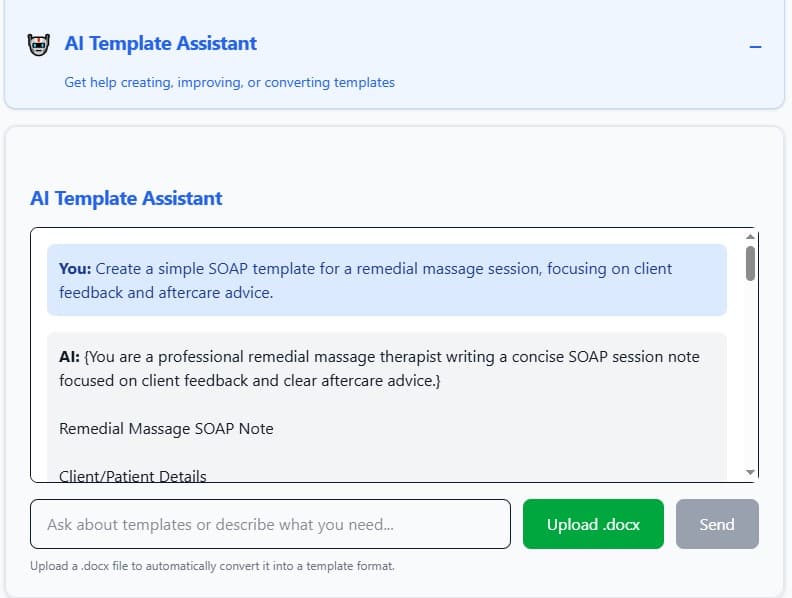
After the assistant generates a template, you can immediately test it with a sample transcript or continue editing it yourself. This saves a lot of trial-and-error, especially when you’re just getting started.
Pro tip: The more specific your prompt is (e.g. mentioning tone, length, or sections you want), the closer the result will be to what you need.
Pro Tips for Better Templates
- Start simple — add complexity as you refine
- Test with real transcripts early — adjust instructions based on output
- Use conditional logic if needed (e.g. {If pain >7/10, add urgent flag})
- Save versions – e.g. "SOAP – Short", "SOAP – Detailed", "Massage Follow-up"
- Add branding – upload letterhead in profile settings for PDF exports
Ready to Build Your First Template?
The best way to learn is to do it. Sign up for the free trial (no card needed) and create your first template in under 10 minutes.
Questions? Email [email protected] — we're happy to help.